Offboarding9 tasks
Start the offboarding
The employee, the notice date, the last working day and the reason for leaving. The checklist is ready from the template.

A plan for each leaver in a minute: the handover, the equipment and access, the documents and the exit interview — each task with a date and an owner. The employee answers the exit interview by a link, and the reason for leaving stays in the card. Free for up to 25 employees.
The checklist keeps the dates from the notice and from the last working day.
The employee, the notice date, the last working day and the reason for leaving. The checklist is ready from the template.
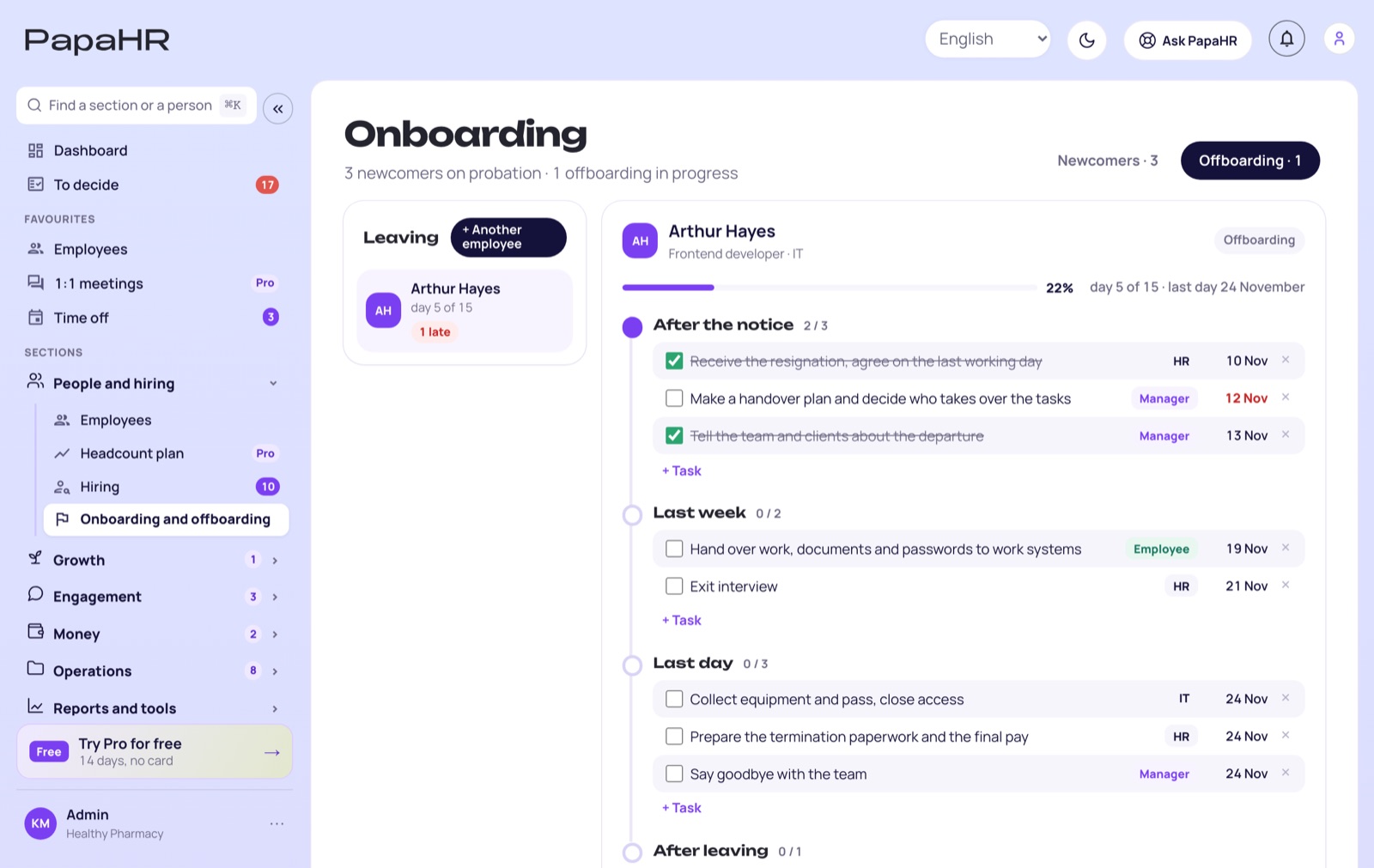
The handover, the equipment and access, the paperwork and the final pay — each task has an owner and a date.
The employee answers the exit interview by a link. HR sees the answers, the reason stays in the card for the turnover report.
The real template of PapaHR. Set the notice date and the last working day — the dates move with them.
In PapaHR the plan is created from this template in one click. If the person holds company equipment, the task to collect it is added by itself.
Create an offboarding plan for free →Real screens of PapaHR with a sample company. Click a section.
In the free plan, with no time limit and no card.
9 tasks from the notice to the review after leaving.
Add and remove tasks in any plan.
HR, the manager, IT and the employee.
What the person holds — on the task of the last day.
The employee sees the plan and answers from the phone.
5 questions; HR sees the answers, the manager does not.
9 reasons in the card — for the turnover report.
«Stayed» closes the plan and keeps the card.
Leavers and sample employees are not counted. The price is per employee, not per HR user.
Employee cards, the org chart, time off, onboarding and hiring — free, with no time limit.
More than 25 employees — Pro. Pro has no limit on employees and adds HR users, 1:1s, reviews and goals. You can try it for 14 days for free.

We earn when a company grows and needs Pro: more than 25 people, HR users besides the owner, 1:1s, reviews and goals. A small company gets the core of an HR system for free — and stays as long as it likes.
Create an offboarding plan for free$1.50 per employee a month paid yearly, at least 10 employees. No fee per HR user.
🎁 Pro can be turned on for 14 days for free, with no card — one button inside PapaHR.
Pricing →Yes: up to 25 employees in the free plan, with no time limit and no card. Leavers and sample employees are not counted.
9 tasks in four stages: after the notice — the resignation, the handover plan, telling the team and clients; the last week — the handover and the exit interview; the last day — the equipment and access, the paperwork and the final pay, the goodbye; after leaving — the review of the reasons. You change any task in your plan.
The employee gets the plan by a link and answers 5 questions from 1 to 5 — about the job, the manager, the pay, the growth and whether they would recommend the company — and can add a comment. HR sees the answers, the manager does not.
When the plan is done, the employee gets the status «Left» with the date and the reason — the card and the history are kept, and the leaver is not counted in the free plan limit.
Press «Stayed» — the plan is closed and the card does not change.
Yes: the free offboarding checklist and the exit interview questions open without a sign-up — the links are below.
Sign up, pick the employee and the last working day — the checklist with the dates is ready in a minute.
Create an offboarding plan for free →