ENUARUPTES Sign in Start for free
For owners and HR who want the numbers without a spreadsheet

A free HR dashboard that counts itself

Add your team once — PapaHR counts headcount, turnover, sick days and who is away today, shows what is ahead and sends the report of the month by email on the 1st. Free for up to 25 employees.

  • Free for up to 25 employees
  • No card, no time limit
  • No formulas to keep
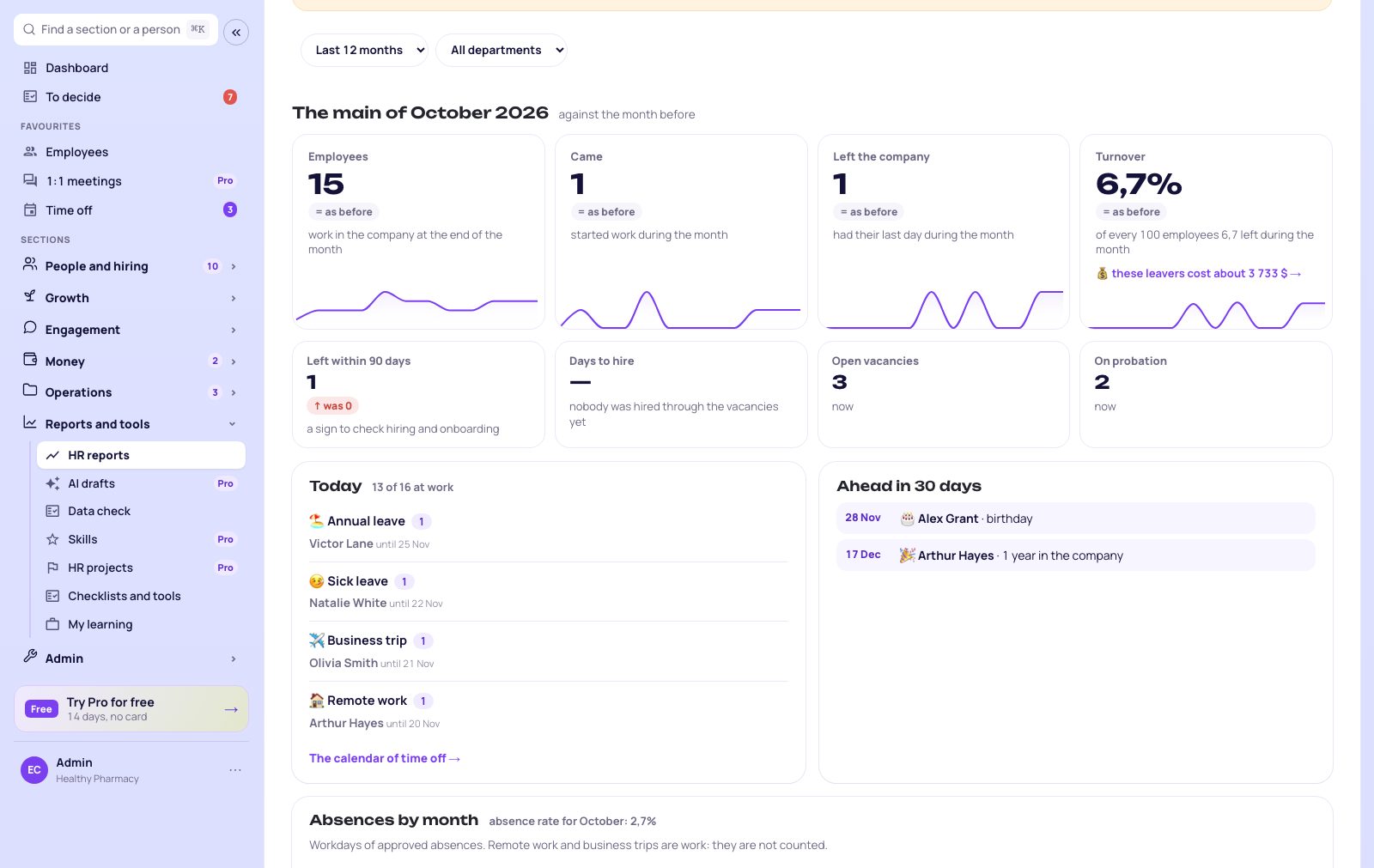
8cards of the month with a line of 12 months
30 daysahead: probation ends and anniversaries
1stof every month — the report by email
$0no card and no time limit
How it works

From a list of people to numbers in three steps

No formulas and no set-up: the numbers come from the employee cards and the other sections of PapaHR.

📥Excel · 42 peoplenames, positions, departments
📅Hire datesfor tenure and turnover
🚪Who left and whyfor the reasons of leaving
1

Add your team

One by one or from Excel: name, position, department, hire date. Time off, sick leave, hiring and leavers come from the other sections as you work.

📉Turnover4.8%
🤒Sick days14
⏳Probation ends2
💡 Early turnover — check hiring and onboarding
2

PapaHR counts

Headcount, hires and leavers, turnover and why people leave, tenure, sick days and the absence rate, how the team is covered by 1:1s and reviews — by month and by department.

✉️ PapaHR · November 1 📊 HR report for October Employees: 42 (was 41)Came: 3 · left: 2 · turnover: 4.8%Sick days: 14 · absence rate: 2.1%Probation ends in 30 days: Liam, Ava Open the reports →
3

The numbers come to you

On the 1st of every month the report of the month comes to the owner and HR by email — and to the director, if you add their address. Who is away today and what is ahead are always on the screen.

PapaHR screens

What you will see

Real PapaHR screens with a sample company. Click a tab.

HR reports in PapaHR
Spreadsheet or PapaHR

Why a spreadsheet is not an HR dashboard

📊 Spreadsheet + formulas

  • The numbers are only as fresh as the last update
  • One broken formula — and turnover lies
  • Sick days live in another file
  • Nobody sees probation ends coming
  • The report for the director is put together by hand

PapaHR

  • The numbers update themselves as people work
  • Turnover, tenure and reasons counted the same way every month
  • Absences come straight from time off
  • Probation ends and anniversaries 30 days ahead
  • The report of the month comes by email on the 1st
What is free

The whole HR dashboard is free for up to 25 employees

Not a trial and not a cut-down version: everything below, with no time limit.

📊Cards of the month

Eight key numbers with a line of 12 months.

📉Turnover and reasons

Turnover, early turnover and why people leave.

🤒Absences

Who is away today, sick days by month, absence rate.

⏳Ahead in 30 days

Probation ends, work anniversaries, birthdays.

📈Trends

Headcount, hires and leavers, tenure.

✅HR process coverage

1:1s, plans, job profiles, reviews, onboarding.

🏢By department

Every number by department and by period.

📨Report by email

On the 1st to the owner, HR and the director; CSV and PDF.

Your plan

Free or Pro for your company

The price is per employee, not per report or per user.

Why it is free

PapaHR is an HR platform: the reports count what you already keep in it — employee records, time off, hiring and onboarding — free for up to 25 employees. We earn when a company grows and needs Pro.

Get the dashboard for free
What Pro adds

When you need the money side

$1.50 per employee a month paid yearly, at least 10 employees.

HR in money: what turnover and burnout costQuestions about the numbers to the AIA note for the director written by the AISalaries and gradesHR budgetEmployees without a limit

🎁 Pro can be turned on for 14 days for free, with no card — one button inside PapaHR.

Pricing →

Questions

Is it really free?

Yes. HR reports, the cards of the month, absences, what is ahead, the report by email, CSV and PDF are in the free plan for companies of up to 25 employees, with no time limit and no card.

Where do the numbers come from?

From the employee cards — hire date, department, the last day and the reason for leaving — and from the other sections: time off, hiring, 1:1s, reviews and onboarding. Nothing to type in twice.

How is turnover counted?

Leavers of the period divided by the average headcount of the period, in percent. Early turnover is leaving within the first 90 days.

Can the director get the report without an account?

Yes. Add their email to the «HR report of the month» notification in the company settings — on the 1st the report comes to them too.

Can I see one department only?

Yes: every report has a department filter, and the table by department shows them side by side. Departments under 5 people are not shown on their own so as not to point at a person.

Can I export the data?

Yes: the list of employees with what each one is covered by — to CSV; the whole page — to PDF or print.

HR numbers without a spreadsheet — today

Sign up, add your team from Excel and see the dashboard in five minutes.

Get the dashboard for free →

I have an account →